Search
Using the Search View
By using the search view provided by Global iNavi Navigation SDK, you can easily implement a search screen and its functions.
Add 'SimpleSearchBarView' to the Activity layout XML file.
'SimpleSearchBarView' is not an actual search box, but a component that navigates to the search screen. When clicked, it opens the search screen.
<com.inavisys.navisdk.ui.component.SimpleSearchBarView
        android:id="@+id/search_fragment_container"
        android:layout_width="match_parent"
        android:layout_height="wrap_content"
        app:layout_constraintTop_toTopOf="parent"
        app:layout_constraintStart_toStartOf="parent"
        app:layout_constraintEnd_toEndOf="parent"
    />
Method 1: Using Interface Builder (Storyboard/XIB)
Add a UIView to your XIB or Storyboard and set its Custom Class to InvSimpleSearchBar.
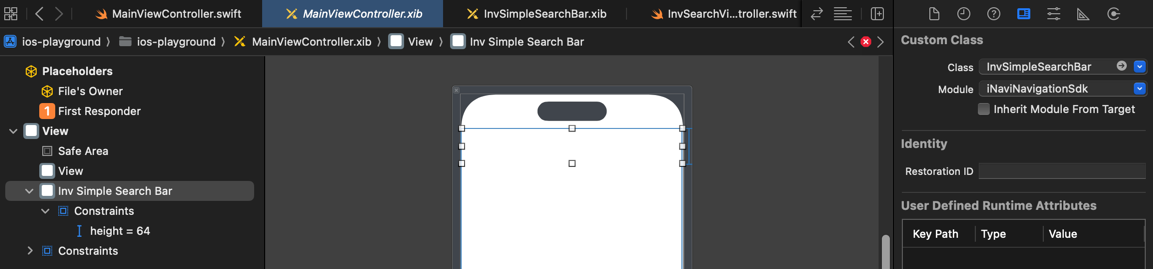
Method 2: Programmatic Approach.
If you prefer to build UI purely with code, add the view to your ViewController as shown below.
override func viewDidLoad() {
    super.viewDidLoad()

    let searchBar = InvSimpleSearchBar()
    searchBar.translatesAutoresizingMaskIntoConstraints = false

    view.addSubview(searchBar)

    NSLayoutConstraint.activate([
        searchBar.topAnchor.constraint(equalTo: view.safeAreaLayoutGuide.topAnchor, constant: 10),
        searchBar.leadingAnchor.constraint(equalTo: view.leadingAnchor, constant: 20),
        searchBar.trailingAnchor.constraint(equalTo: view.trailingAnchor, constant: -20),
        searchBar.heightAnchor.constraint(equalToConstant: 64)
    ])
}
Search Screen
When SearchBar clicked, it opens the search screen.
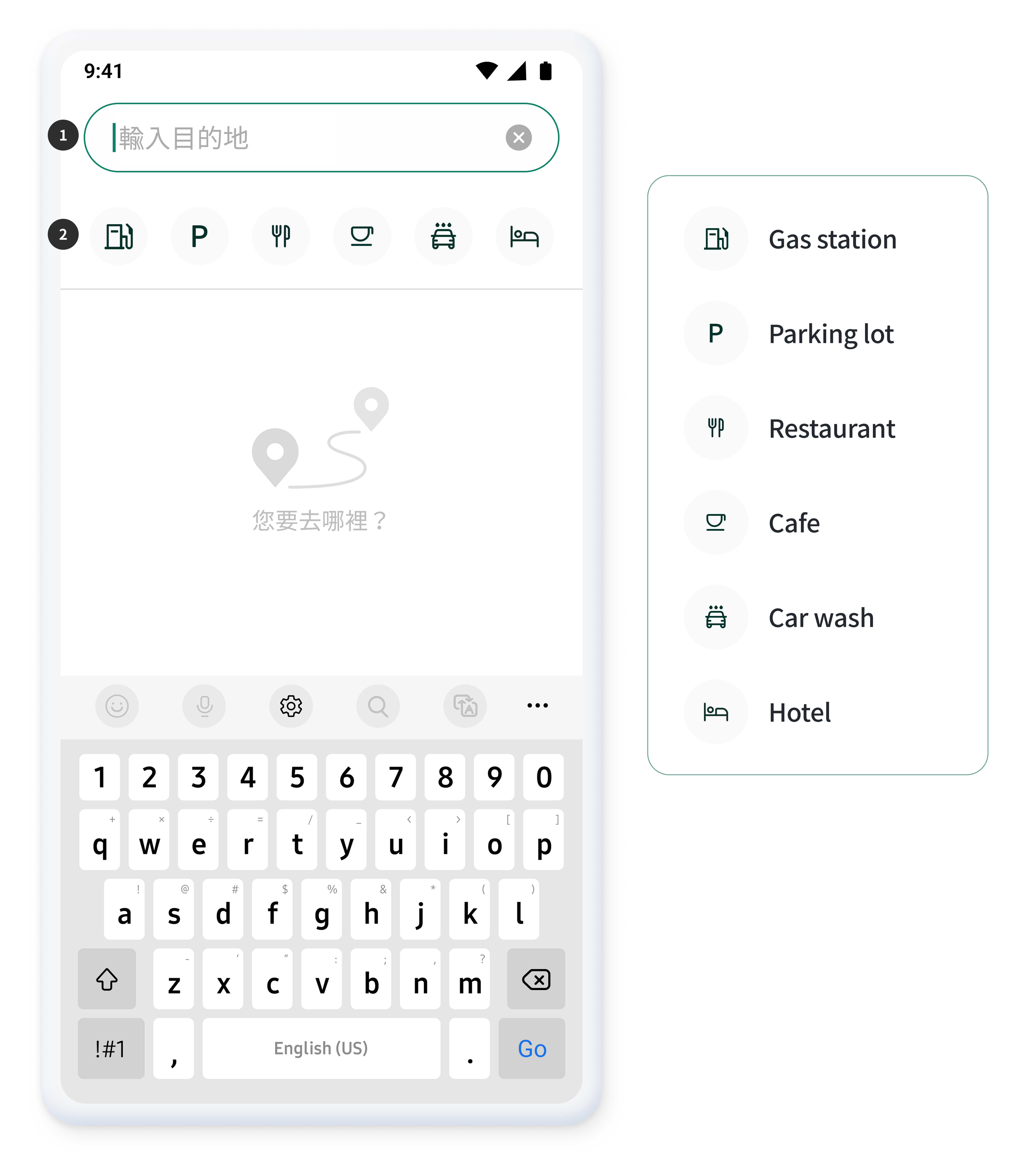
- When the search bar is tapped, the keyboard appears at the bottom, allowing the user to enter a search term.
- Users can search by selecting from different categories.
Search Results
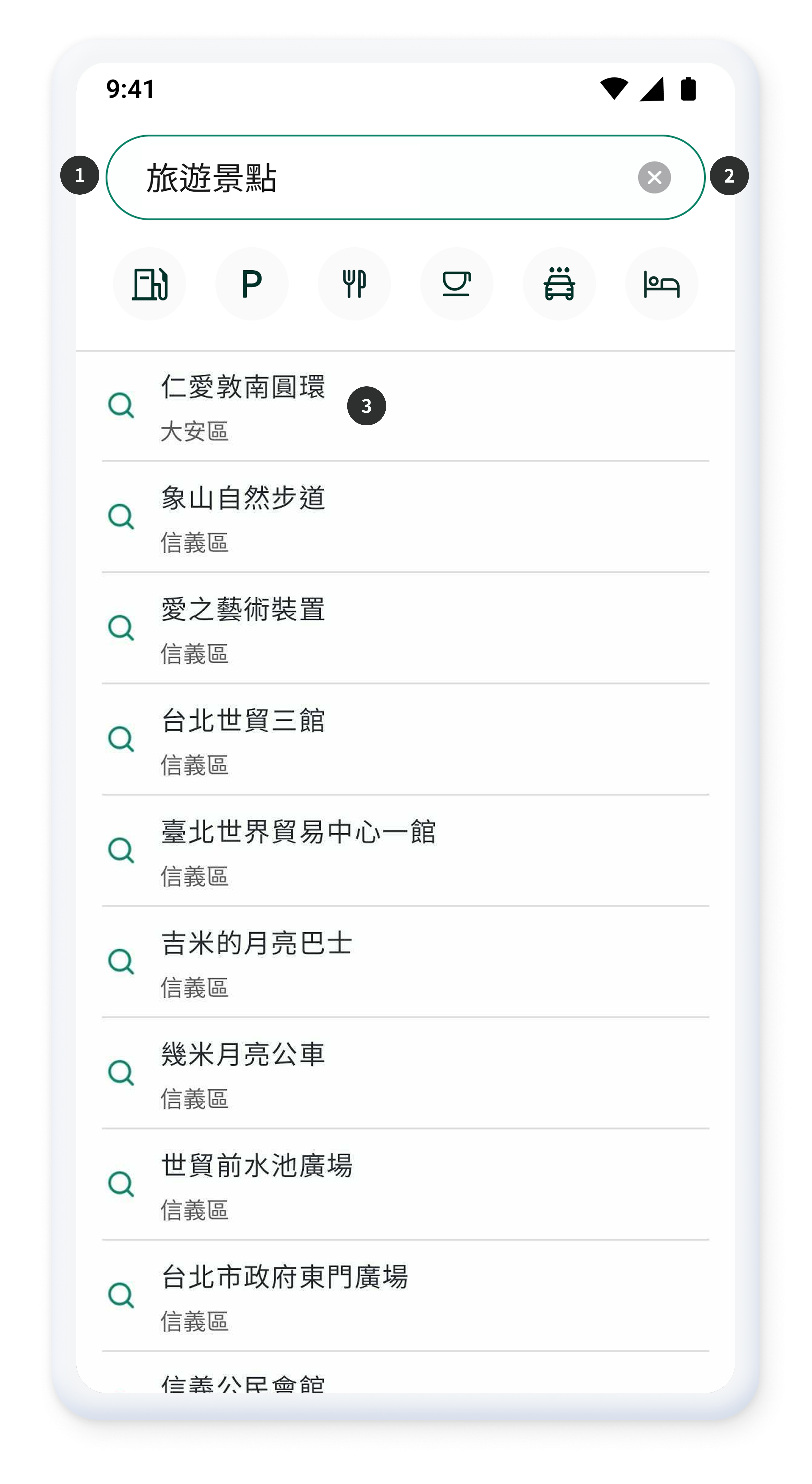
- Displays results for the entered keyword in order of relevance.
- Allows the entered keyword to be cleared.
- Shows related place names and corresponding road names in order of relevance.
Search results are displayed in order of relevance, up to a maximum of 20 items. When a search result item is clicked, a route search is requested and the user is redirected to the Route Result Screen
Using the API Without the Search View
This section provides a guide on how to perform search operations by directly calling the Search API, without relying on the pre-built SearchView UI component. This approach is recommended when you need to implement a fully customized search UI or integrate search functionality into an existing application flow. By interacting directly with the API, you can gain full control over the request parameters and the handling of raw search results.
Calling the Search API
Calling NaviContollers runSearch
    // Search term
    val strSearchQuery = "hotel"
    // Coordinates used for the search request (generally the user’s current position)
    val reqSearchCoord = NaviController.getCurrentPosition().coordinate

    NaviController.runSearch(ReqSearch(strSearchQuery,reqSearchCoord), listener = object: OnSearchListener {
        override fun onSuccess(response: List<LocationInfo.SearchItem>) {
            // Success
        }

        override fun onFail() {
            // Fail
        }
    })
Calling InaviController's runSearch
// Search term
let searchQuery = "hotel"
// Coordinates used for the search request (generally the user's current position)
let currentPosition = InaviController.shared.getCurrentPosition()
let reqSearchCoord = InvCoordinate(
    wgsLon: currentPosition.coordinate.wgsLon,
    wgsLat: currentPosition.coordinate.wgsLat
)

// Create search request
let reqSearch = InvReqSearch(query: searchQuery, coordinate: reqSearchCoord)

// Perform search
InaviController.shared.runSearch(req: reqSearch) { status in
    switch status {
    case .success(let items):
        // Success: Handle search results
    case .failure:
        // Fail: Handle error
    }
}
The main classes are as follows:
InvReqSearch, InvSearchItem, SearchStatus (enum with .success(items) and .failure cases)
Calling the TomTom Geocoding API
Geocoding is the process of converting an address into coordinates. You can call the TomTom GeoCoding API directly by using NaviController.
Use the NaviController.requestGeocoding() method and pass the address as a parameter. The API call result is delivered asynchronously through OnGeocodingListener.
// Address for geocoding request
val reqAddress = "Taipei City Hall"

// Call the Geocoding API through NaviController
NaviController.requestGeocoding(
    address = reqAddress,
    // Register a listener to handle the API call result.
    onGeoCodingListener = object : OnGeocodingListener {
        // If the call is successful, a geocodeResponse is returned that includes the converted coordinate information.
        override fun onSuccess(geocodeResponse: InvGeocodeResponse) {
            Log.d(TAG, "Geocoding Success: $summary")
            // You can display the result in the UI or handle it with other logic.
        }

        // If the call fails, an error code and message are returned.
        override fun onFail(errorCode: Int, errorMsg: String) {
            Log.e(TAG, "Geocoding Failed: code=$errorCode, msg=$errorMsg")
        }
    }
)
Geocoding is the process of converting an address into coordinates. You can call the TomTom GeoCoding API directly by using InaviController.
Use the InaviController.shared.requestGeocoding() method and pass the address as a parameter. The API call result is delivered asynchronously through a completion closure.
// Address for geocoding request
let reqAddress = "Taipei City Hall"

// Call the Geocoding API through InaviController
InaviController.shared.requestGeocoding(address: reqAddress) { status in
    switch status {
    case .success(let geocodeResponse):
        // If the call is successful, geocodeResponse includes the converted coordinate information
        print("Geocoding Success")
        if let results = geocodeResponse.results, !results.isEmpty {
            let firstResult = results[0]
            // Use wgsLat/wgsLon properties
            print("Location: \(firstResult.position?.wgsLat ?? 0), \(firstResult.position?.wgsLon ?? 0)")
            // You can display the result in the UI or handle it with other logic
        }

    case .failure(let errorCode, let errorMsg):
        // If the call fails, an error code and message are returned
        print("Geocoding Failed: code=\(errorCode), msg=\(errorMsg)")
    }
}
Calling the TomTom Reverse GeoCoding API
Reverse Geocoding is the process of converting coordinates (latitude and longitude) into an address. You can call the TomTom ReverseGeoCoding API
Use the NaviController.requestReverseGeocoding() method and pass the latitude and longitude as parameters. The API call result is delivered asynchronously through OnReverseGeocodingListener.
// Coordinates for reverse geocoding request
val requestLocationLat = 25.037727
val requestLocationLon = 121.511246

// Call the Reverse Geocoding API through NaviController.
NaviController.requestReverseGeocoding(
    lat = requestLocationLat.toFloat(),
    lon = requestLocationLon.toFloat(),
    // Register a listener to handle the API response.
    onReverseGeocodingListener = object : OnReverseGeocodingListener {
        // If the call is successful, the converted address information is returned.
        override fun onSuccess(reverseGeocodeResponse: InvReverseGeocodeResponse) {
            if (results != null && results.isNotEmpty()){
                val address = reverseGeocodeResponse.addresses?.firstOrNull()?.address.freeformAddress
                // The result can be displayed in the UI or processed by other logic.
            }
        }

        // If the call fails, an error code and message are returned.
        override fun onFail(errorCode: Int, errorMsg: String) {
            Log.e(TAG, "Reverse Geocoding Failed : code=$errorCode, msg=$errorMsg")
        }
    }
)
Use the InaviController.shared.requestReverseGeocoding() method and pass the coordinates as a parameter. The API call result is delivered asynchronously through a completion closure.
// Coordinates for reverse geocoding request
let requestLocationLat = 25.037727
let requestLocationLon = 121.511246
// Note: Parameter order is (wgsLon, wgsLat)
let coordinate = InvCoordinate(wgsLon: requestLocationLon, wgsLat: requestLocationLat)

// Call the Reverse Geocoding API through InaviController
InaviController.shared.requestReverseGeocoding(coordinate: coordinate) { status in
    switch status {
    case .success(let reverseGeocodeResponse):
        // If the call is successful, the converted address information is returned
        if let addresses = reverseGeocodeResponse.addresses, !addresses.isEmpty {
            let firstAddress = addresses[0]
            let freeformAddress = firstAddress.address?.freeformAddress ?? "Unknown address"
            print("Address: \(freeformAddress)")
            // The result can be displayed in the UI or processed by other logic
        }

    case .failure(let errorCode, let errorMsg):
        // If the call fails, an error code and message are returned
        print("Reverse Geocoding Failed: code=\(errorCode), msg=\(errorMsg)")
    }
}