Route Search
Displaying the Route Search Screen
When a search item is selected through the search view provided by Global iNavi Navigation SDK, the user is directed to the route search screen.
Depending on the case, 1 to 3 route results are displayed, and you can swipe left or right to select one.
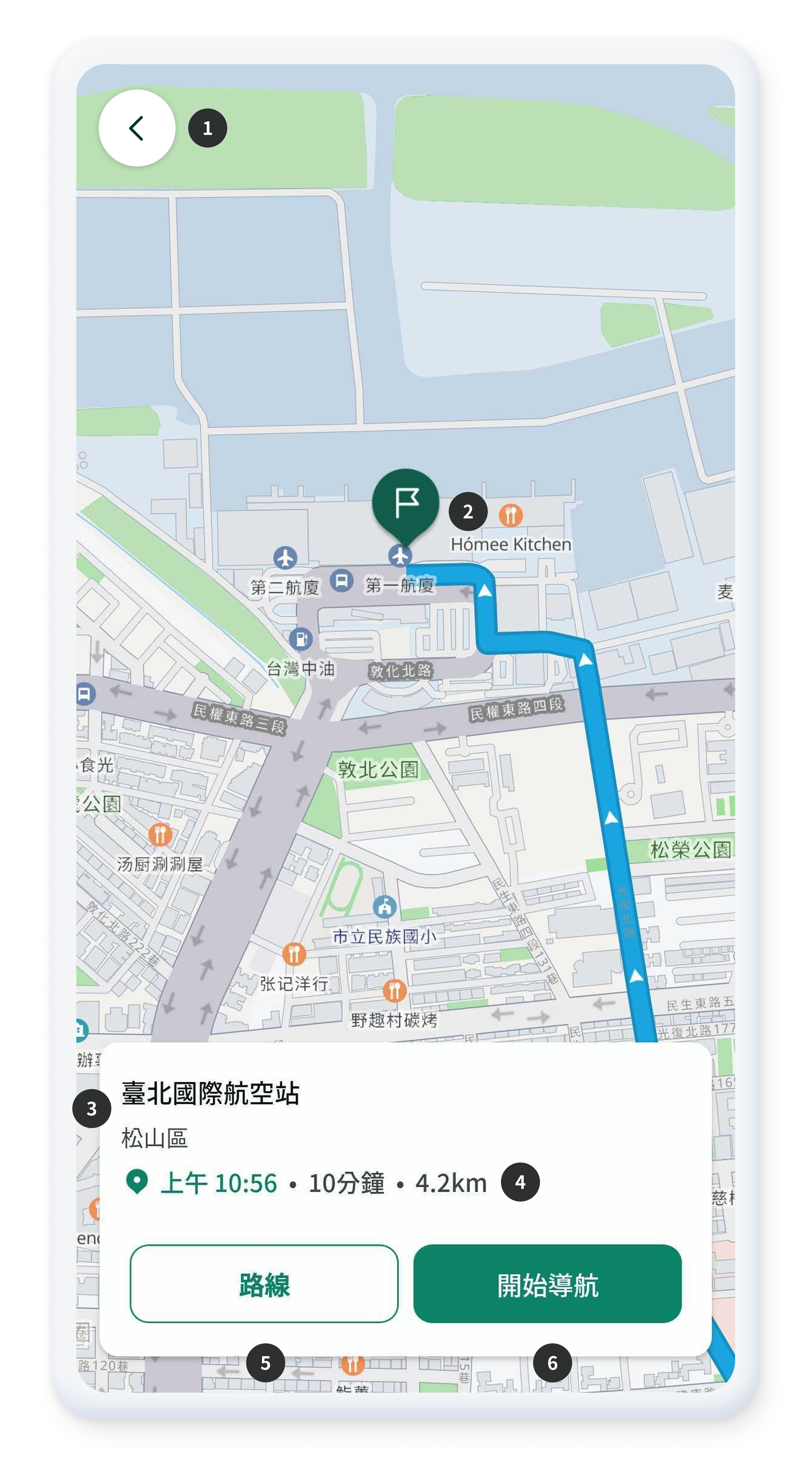
- Button to return to the previous screen.
- Marker indicating the destination location.
- Displays the name and road name of the selected route.
- Displays the estimated arrival time, driving time, and driving distance.
- Button to show detailed turn-by-turn information for the selected route.
- Starts navigation guidance for the selected route.
Starting Navigation Without UI
Without using the built-in search/route UI in the SDK, you can directly search for a route and start navigation through NaviController. This approach allows customization, such as starting navigation with location data (origin, waypoints, destination) configured by the developer.
Route guidance consists of the following two steps
-
Route Search: Call
NaviController.runRoute()with the origin, waypoints, and destination information. See also -
Start Guidance: If the route search is
successful, call
NaviController.runGuidance()with the returned route ID to start actual navigation guidance. See also
The following is a sample code that starts navigation using the current location as the origin, and previously searched locations as waypoints and the destination.
// 1. Origin Setting: Set the current location as the origin.
val startPos = LocationInfo.fromNaviLocationToRoutePtItem(
    NaviController.getCurrentPosition(), "Start"
)

// Create a list to store the waypoints.
val viaList: MutableList<LocationInfo.RoutePtItem> = mutableListOf()

// 2. Set Destination and Waypoints
// Assume that lastSearchItemList is the search result list obtained from a previous Search API call.
// Use LocationInfo.fromSearchItemToRoutePtItem to convert the search results into RoutePtItem objects required for route search.

// Set the first item in the search results as the destination.
val goalPos: LocationInfo.RoutePtItem = LocationInfo.fromSearchItemToRoutePtItem(
    lastSearchItemList[0],
    lastSearchItemList[0].mainTitle ?: "Goal",
    0
)
// Set the last item in the search results as a waypoint
val via = LocationInfo.fromSearchItemToRoutePtItem(
    lastSearchItemList.last(),
    lastSearchItemList.last().mainTitle ?: "Via",
    0
)
viaList.add(via)

// 3. Route Search Request
// Request a route search using the configured origin, destination, and waypoints.
NaviController.runRoute(
    start = startPos,
    end = goalPos,
    via = viaList,
    object : OnOrbisRouteListener {
        // 4. Handling the Route Search Response
        override fun onSuccess(listID: List<String?>) {
            // If the route search succeeds, you receive the returned route ID list(listID).
            // Start guidance using the first route ID.
            listID[0]?.let { routeId ->
                val currentSearchItem = lastSearchItemList[0]
                // Pass the route ID and destination information to start the final navigation guidance
                NaviController.runGuidance(currentSearchItem, routeId)
            }
        }

        override fun onFail(errorCode: Int, errorMsg: String) {
            // Handling Route Search Failures
            Log.e("TAG", "onFail: Route search failed. Code: $errorCode, Msg: $errorMsg")
        }
    })
// 1. Origin Setting: Set the current location as the origin.
let currentPosition = InaviController.shared.getCurrentPosition()
let startCoord = InvCoordinate(
    wgsLon: currentPosition.coordinate.wgsLon,
    wgsLat: currentPosition.coordinate.wgsLat
)
let startPos = InvRoutePtItem(
    name: "Start",
    address: "",
    coordinate: startCoord,
    angle: Int(currentPosition.angle)
)

// Create an array to store the waypoints.
var viaList: [InvRoutePtItem] = []

// 2. Set Destination and Waypoints
// Assume that lastSearchItemList is the search result array obtained from a previous Search API call.
// Convert the search results into InvRoutePtItem objects required for route search.

// Set the first item in the search results as the destination.
let destinationSearchItem = lastSearchItemList[0]
let goalPos = InvRoutePtItem(
    name: destinationSearchItem.mainTitle,
    address: destinationSearchItem.addrJibun,
    coordinate: destinationSearchItem.coordinate,
    angle: 0
)

// Set the last item in the search results as a waypoint
let viaSearchItem = lastSearchItemList.last!
let via = InvRoutePtItem(
    name: viaSearchItem.mainTitle,
    address: viaSearchItem.addrJibun,
    coordinate: viaSearchItem.coordinate,
    angle: 0
)
viaList.append(via)

// 3. Route Search Request
// Request a route search using the configured origin, destination, and waypoints.
InaviController.shared.runRoute(
    start: startPos,
    end: goalPos,
    via: viaList
) { status in
    // 4. Handling the Route Search Response
    switch status {
    case .success(let listID):
        // If the route search succeeds, you receive the returned route ID list(listID).
        // Start guidance using the first route ID.
        if let routeId = listID.first as? String {
            let currentSearchItem = lastSearchItemList[0]
            // Pass the route ID and destination information to start the final navigation guidance
            InaviController.shared.runGuidance(searchItem: currentSearchItem, routeID: routeId)
        }

    case .failure(let errorCode, let errorMsg):
        // Handling Route Search Failures
        print("Route search failed. Code: \(errorCode), Msg: \(errorMsg)")
    }
}
Detailed Information and Simulation

- Displays detailed turn-by-turn information for the selected route.
- Marker indicating the origin location.
- Marker indicating the destination location.
- Shows turn icons at each maneuver point (e.g., right turn, left turn).
- The list can be scrolled for review.
- Simulate the selected route with Route Simulation.
- Start Navigation Guidance for the selected route.